If you’re planning to use DeTikZify to turn images, sketches, or diagrams into editable LaTeX TikZ code, it’s important to know whether your computer can handle the software. The good news is that DeTikZify doesn’t require extremely powerful hardware for basic use, making it accessible to students, researchers, developers, and LaTeX enthusiasts. However, your experience will depend on factors such as your processor, available RAM, storage, and whether you have a dedicated GPU for faster AI processing.
In this guide, we’ll explain the system requirements for DeTikZify, including the minimum and recommended specifications, supported operating systems, Python requirements, and hardware recommendations. By the end, you’ll know exactly what you need to install and run DeTikZify smoothly and efficiently on your device.
Read More: Is DeTikZify Free to Use?
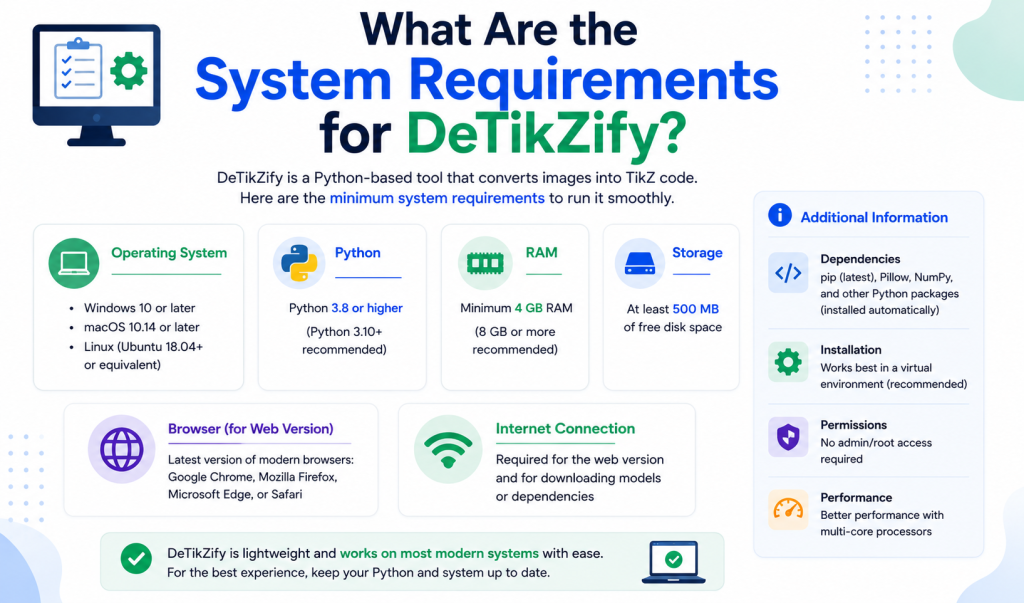
Minimum System Requirements for DeTikZify
For basic installation and testing, your computer should meet these minimum specifications:
| Component | Minimum Requirement |
|---|---|
| Operating System | Windows 10/11, macOS, or Linux |
| Processor | 64-bit dual-core CPU |
| RAM | 8 GB |
| Storage | At least 10 GB of free disk space |
| Python | Python 3.10 or newer |
| Internet | Required for downloading models and dependencies |
These specifications are enough for installation and light experimentation, although performance may be slower when processing complex images.
Recommended System Requirements
If you plan to use DeTikZify regularly, the following specifications provide a much smoother experience:
| Component | Recommended |
|---|---|
| Operating System | Windows 11, Ubuntu 22.04+, or macOS |
| Processor | Modern Intel Core i5/i7, AMD Ryzen 5/7, or Apple Silicon |
| RAM | 16 GB or more |
| Storage | SSD with 20 GB or more of free space |
| GPU | NVIDIA GPU with CUDA support (optional but recommended) |
| VRAM | 8 GB or more for local AI inference |
| Python | Python 3.10+ |
A dedicated GPU can dramatically reduce processing time when generating TikZ code from images.
Supported Operating Systems
DeTikZify is designed to work across multiple platforms, making it accessible to most users.
Windows
Windows 10 and Windows 11 are supported. Make sure you have a recent version of Python installed and keep your package manager up to date before installation.
Linux
Ubuntu and other modern Linux distributions are excellent choices, especially for developers and researchers who frequently work with Python environments.
macOS
DeTikZify also runs on macOS. Both Intel-based Macs and Apple Silicon (M1, M2, and newer) can be used, although setup steps may differ slightly depending on your hardware.
Python Requirements
Python is one of the most important dependencies for DeTikZify.
Recommended version:
- Python 3.10 or newer
Older Python versions may not support all required libraries, which can lead to installation errors or compatibility issues.
Memory (RAM) Requirements
The amount of RAM you need depends on how you plan to use DeTikZify.
- 8 GB RAM: Suitable for learning, testing, and smaller projects.
- 16 GB RAM: Recommended for most users.
- 32 GB or more: Ideal for handling larger AI models or multitasking with multiple development tools.
More memory helps improve responsiveness and reduces the likelihood of slowdowns during AI processing.
GPU Requirements
A GPU is optional but highly beneficial.
CPU Only
You can run DeTikZify using only your processor, but image processing and AI inference will generally be slower.
NVIDIA GPU
An NVIDIA graphics card with CUDA support provides much faster performance for local model execution.
Recommended VRAM:
- 8 GB minimum
- 12 GB or more for larger workloads
If you don’t have a compatible GPU, DeTikZify can still function on the CPU, though processing times will increase.
Storage Requirements
Besides the application itself, you’ll need extra space for Python packages, AI models, and cached files.
Recommended storage:
- Minimum: 10 GB free
- Recommended: 20 GB or more on an SSD
Using an SSD instead of a traditional hard drive can noticeably improve loading times.
Internet Requirements
An internet connection is typically needed when:
- Downloading DeTikZify
- Installing Python packages
- Fetching AI model files
- Updating dependencies
Once everything is installed, many workflows can be performed locally, depending on your configuration.
Additional Software Requirements
For the best experience, it’s helpful to have:
- Git
- pip (Python package manager)
- Virtual environment support (venv or Conda)
- A code editor such as Visual Studio Code
These tools simplify installation, updates, and project management.
Can You Run DeTikZify on a Laptop?
Yes. Many modern laptops can run DeTikZify without issues.
A laptop with:
- Intel Core i5 or AMD Ryzen 5 processor
- 16 GB RAM
- SSD storage
is generally sufficient for everyday use.
If your laptop includes a dedicated NVIDIA GPU, you’ll likely enjoy much faster AI processing.
Tips for Better Performance
To get the most out of DeTikZify:
- Use an SSD instead of an HDD.
- Keep Python and dependencies updated.
- Close unnecessary background applications while processing large images.
- Use a CUDA-enabled NVIDIA GPU if available.
- Ensure sufficient free disk space for models and temporary files.
These simple optimizations can improve both speed and stability.
Conclusion
Knowing the system requirements before installing DeTikZify can save you time and help ensure a smooth setup. While the software can run on most modern computers with a 64-bit operating system, Python 3.10 or later, and at least 8 GB of RAM, a system with 16 GB of RAM, SSD storage, and a dedicated NVIDIA GPU will deliver the best performance for AI-powered TikZ generation. Whether you’re a student creating diagrams for assignments, a researcher preparing academic papers, or a developer working with LaTeX, meeting the recommended requirements will provide a faster and more reliable experience. Before you begin, check that your hardware and software meet the recommended specifications so you can get the most out of DeTikZify.