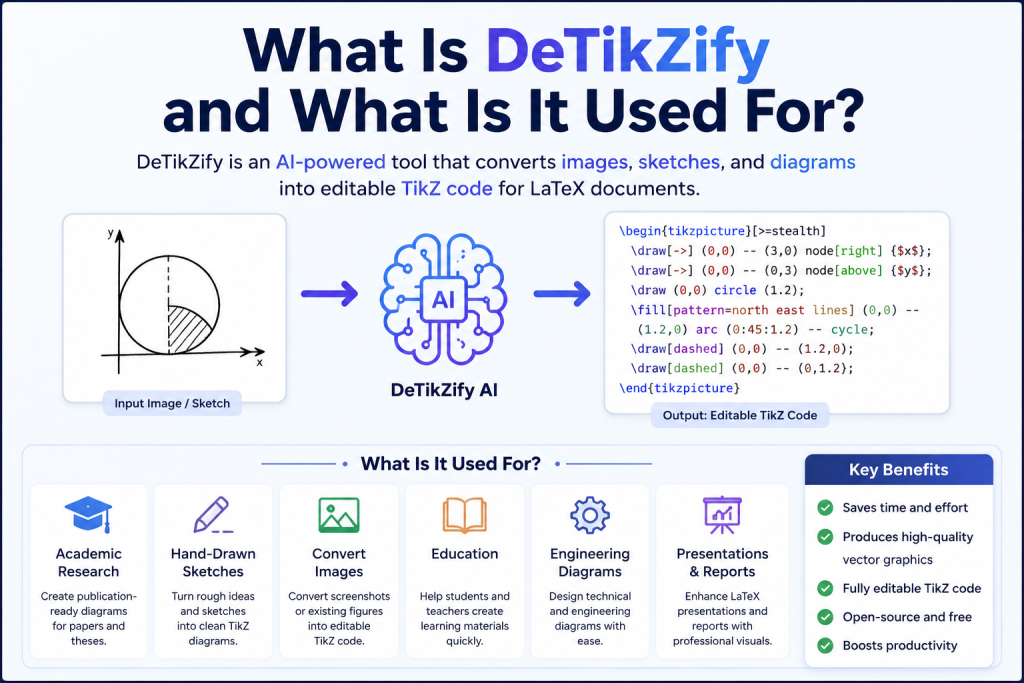
DeTikZify is an innovative open-source AI tool that makes it easier to convert images, diagrams, and hand-drawn sketches into editable TikZ code for LaTeX documents. Instead of spending hours manually recreating figures, users can rely on DeTikZify to generate high-quality TikZ code in just a few steps. Whether you’re a student preparing assignments, a researcher writing academic papers, or an engineer creating technical documentation, installing DeTikZify is the first step toward a faster and more efficient workflow.
Although the setup process involves installing Python and a few supporting tools, it is straightforward when you follow the correct instructions. This guide explains how to download and install DeTikZify on Windows, macOS, and Linux, along with the essential requirements and tips to help you get started without any hassle.
Read More: What Is DeTikZify and What Is It Used For
What Is DeTikZify?
DeTikZify is an open-source AI tool designed to convert images into TikZ, a powerful graphics language used with LaTeX. Instead of manually recreating complex figures, DeTikZify analyzes an image and generates editable TikZ code that you can use in academic papers, reports, presentations, and technical documents.
The project is especially useful for anyone who regularly works with scientific diagrams, mathematical illustrations, flowcharts, or engineering figures.
Before You Download DeTikZify
Before installing DeTikZify, make sure your computer meets the basic requirements.
You’ll need:
- Python 3.10 or newer
- Git (recommended)
- A LaTeX distribution such as TeX Live or MiKTeX
- Ghostscript
- Poppler
- Internet connection for downloading models
- A modern CPU or GPU (GPU recommended for faster AI inference)
While DeTikZify can run on a CPU, using a compatible NVIDIA GPU significantly improves processing speed.
How to Download DeTikZify
Since DeTikZify is an open-source project, it is distributed through its official GitHub repository rather than as a traditional installer.
Follow these steps:
- Install Python on your computer if it isn’t already installed.
- Install Git.
- Open your Terminal or Command Prompt.
- Clone the DeTikZify repository using Git.
- Navigate to the downloaded project folder.
- Install the required dependencies.
After installation, you’ll also need to download one of the supported AI models before generating TikZ code.
Installing DeTikZify on Windows
Windows users should first install Python and ensure it is added to the system PATH.
Next, install Git and a LaTeX distribution such as MiKTeX or TeX Live.
After downloading the DeTikZify project, install the required Python packages using the provided installation instructions.
Finally, install Ghostscript and Poppler, as these tools are required for processing images and PDFs.
Once everything is installed, verify that the application starts correctly before downloading an AI model.
Installing DeTikZify on macOS
On macOS, installation is straightforward if you already use Homebrew.
Install Python, Git, Ghostscript, and Poppler through Homebrew.
Next, install a LaTeX distribution such as MacTeX.
Clone the DeTikZify repository, install its Python dependencies, and download the AI model of your choice.
After completing these steps, you’re ready to convert images into TikZ code.
Installing DeTikZify on Linux
Linux users can install most required packages directly through their distribution’s package manager.
You’ll typically need:
- Python
- Git
- Ghostscript
- Poppler
- TeX Live
After installing the required packages, clone the project repository and install the Python dependencies.
Linux generally provides one of the easiest environments for running DeTikZify.
Downloading the AI Model
Installing the software alone is not enough.
DeTikZify relies on AI models that perform the image-to-TikZ conversion.
Depending on your hardware, you can choose between lightweight models for lower memory usage or larger models that produce more accurate results.
The first model download may take some time because several gigabytes of data need to be downloaded.
Running DeTikZify for the First Time
After installation is complete:
- Open your terminal.
- Load your preferred AI model.
- Provide an input image.
- Start the conversion process.
Within a short time, DeTikZify generates editable TikZ code that you can refine if necessary before using it in your LaTeX document.
Common Installation Problems
Some users encounter installation issues during setup.
Here are the most common problems:
Python Version Errors
Older Python versions may not be supported.
Updating to the latest recommended version usually resolves compatibility issues.
Missing Dependencies
Ghostscript, Poppler, or a LaTeX distribution may not be installed correctly.
Verify that each dependency is installed and accessible from your system.
AI Model Download Issues
Slow internet connections or interrupted downloads can prevent models from installing completely.
Retry the download and ensure enough storage space is available.
GPU Detection Problems
If your GPU isn’t recognized, update your graphics drivers and verify that your machine supports the required AI framework.
CPU mode will still work, although it will be slower.
Tips for Better Results
For the highest-quality TikZ output:
- Use clear, high-resolution images.
- Avoid blurry or noisy screenshots.
- Crop unnecessary background elements.
- Start with simple diagrams before converting highly complex figures.
- Review and edit the generated TikZ code for the best final result.
Following these tips can improve both conversion accuracy and editing efficiency.
Is DeTikZify Safe to Download?
Yes. DeTikZify is an open-source project, and downloading it from its official source helps ensure you receive the latest version of the software.
To stay secure, avoid downloading unofficial or modified versions from unknown websites.
Conclusion
Downloading and installing DeTikZify is a simple process once you have the required tools and dependencies in place. After completing the setup, you can quickly transform images, diagrams, and sketches into editable TikZ code, saving valuable time when creating LaTeX documents. Whether you’re using Windows, macOS, or Linux, following the correct installation steps ensures a smooth experience and helps you avoid common setup issues. As an open-source AI tool, DeTikZify continues to be a valuable resource for students, researchers, educators, and professionals who need high-quality technical illustrations. With everything installed correctly, you’ll be ready to start generating accurate TikZ graphics and streamline your document creation workflow.